Update on Python Physics Curriculum

So here is the deal.  I had this idea.  The plan was to include numerical calculations into the intro physics curriculum by writing a sort of online textbook.  Or maybe just redo my Just Enough Physics ebook to include more numerical calculations.  Anyway, this is what I came up with. It’s written with trinket.io – an online implementation of python that pretty much rocks.

Here is my curriculum (it’s incomplete – but totally free).

Introductory Physics with Python

Here are some of my own thoughts on this curriculum (including using trinket.io):

  • It’s free and online.  That’s mostly good – but I don’t know if online is the best format for physics.
  • There is one thing about trinket.io that makes this rock.  There is python RIGHT IN THE PAGE.  Readers can view and run code – no logging in, no saving, nothing.  Just edit and run.  No barriers.
  • It has the same idea as Just Enough Physics in that it goes over the basic stuff – but doesn’t overload the student with tons of different ideas (no fluid dynamics, waves, buoyancy, sound…).  It’s not that those are bad topics, it’s just too much.  Too much.
  • Homework.  Students want homework questions.  I sort of added those in – but students seem to want traditional homework questions.

Now for the part that needs work.  Well, all of it needs work – it’s not complete.  But I made an error – I figured I would finish this curriculum as I was using it to teach the summer session of physics, but the pressure was too much.  In the end, I think I made it too much like the traditional format of a textbook (with the traditional order of topics).  Really, I started along the best path – but went off the rails when I wanted to do a problem that involved new physics.  So, I just added that new stuff in there.

I need to rethink just what I want to cover – and here is my new plan.

  • Kinematics in 1-D and 2-D. I like starting with kinematics because students can model motion and this works great with numerical calculations.  The one problem is that you have to use acceleration instead of change in momentum – and this messes up with my momentum principle.  Actually, maybe I will just do 1-D motion so that I don’t need vectors.
  • Forces. I don’t really want to focus on forces and equilibrium, but the students need this to do more stuff.  In this, I need to do the following.
    • Vectors.  Boom – need vectors.
    • Special forces: gravity, real gravity, maybe Coulomb force.
    • What about friction, and forces of constraint (like the normal force)?  Here you can see how it gets out of hand.  Friction is super crazy if you think about it – so are normal forces.
    • What if I just did simple forces – like pushing with your hand or rockets?
  • Momentum Principle.  Here I need to make a connection between forces and motion.  Since I used acceleration before, I need to make a connection between the momentum principle and \vec{F}_\text{net} = m\vec{a}.  Honestly, I hate calling this Newton’s Second Law – it seems wrong.
    • But what about circular acceleration?  How do you deal with that?  I don’t know.  Maybe just avoid it for now.
  • Work Energy Principle. I think this is mostly ok – except I need to introduce the spring force and spring potential energy.
  • Angular Momentum Principle.  My initial idea was to cover “Three Big Ideas” – momentum principle, work-energy, angular momentum principle.  However, there is SO MUCH baggage associated with angular momentum principle.  Much of this stuff is just beyond intro-level students.

I think I have a new plan.

  • Start with kinematics in 1-D.
  • Forces – but simple stuff.  No friction.  No normal forces.  All the examples will be in space or something.
  • Momentum Principle and acceleration. Again, normal stuff.  No forces of constraint.  Mostly space stuff because that will be fun.  Projectile motion stuff too.
  • Work-Energy Principle.  Springs, gravity, dropping objects.  Orbits.
  • Special cases.  Instead of Angular Momentum, I’m going to go over forces of constraint, friction, normal forces, circular acceleration.

The end.  Oh, I need to make sure there are plenty of exercises for students.  Rewrites coming.

Numerical Calculation Collection

The following are some of my best posts about numerical calculations.

Working notes for my bouncing ball running model

I’ll be honest.  I had some problems getting my bouncing ball running model working.  Oh, here is the model.

https://www.wired.com/story/how-is-a-runner-like-a-bouncing-ball/

Basically, this models the speed of a running human by assuming they are bouncing ball.  When the human impacts the ground, there is some maximum impact force and an impact time.  The impact time decreases with horizontal velocity such that eventually, all the force is used in the vertical direction to keep the human off the ground long enough to switch feet in the air.  The end.

As I was making this model, I took some notes because I couldn’t get it to work.  Here are my notes.  Hopefully you can use this to see how to troubleshoot a program.

Running model notes

I think I mostly have it working:

http://www.glowscript.org/#/user/rhettallain/folder/blog_posts/program/runningbouncemodel/edit

Here is basically how it works.  Two big ideas:

  • Humans can push off the ground with some maximum force.  This force does two things – gets them off the ground and in the air so legs can move and pushes them forward
  • The contact time with the ground is small and gets smaller as horizontal speed increases
  • This means as the human speeds up, the ground force eventually gets to where it can only push up and not forward

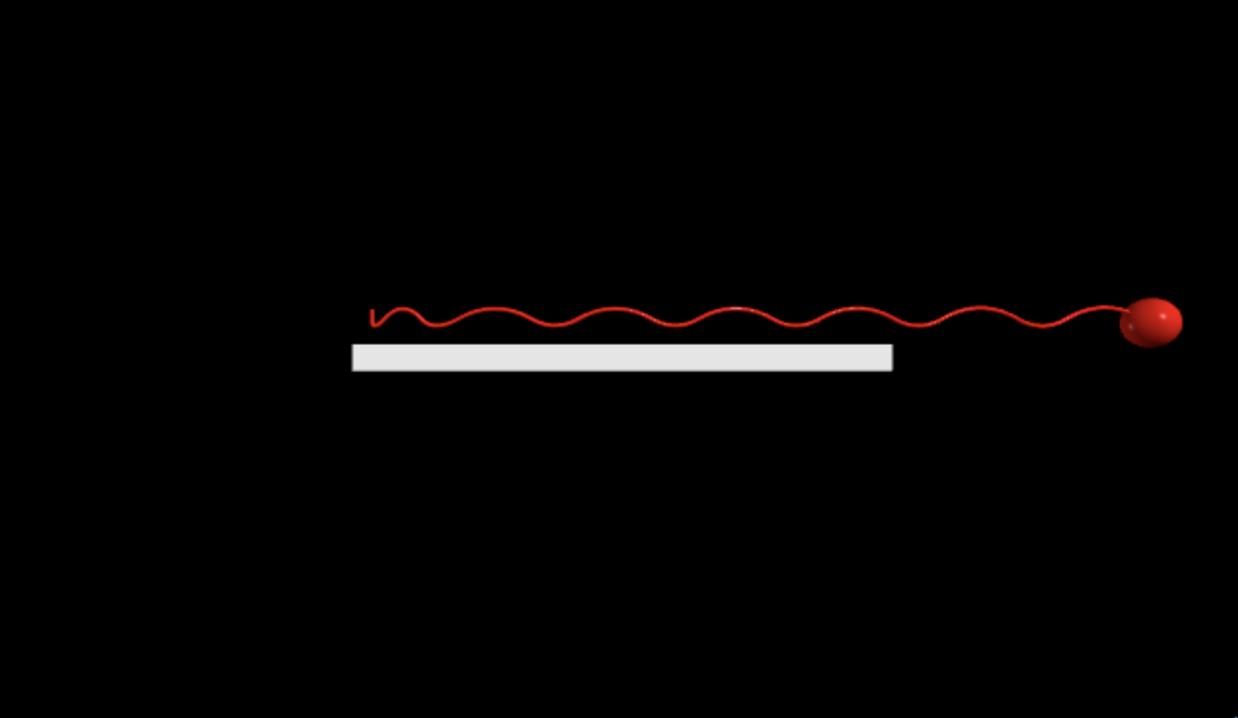
Here is what it looks like so far

Here is a graph of speed vs. time

  • This model reaches a max speed of about 3.5 m/s in just a couple of strides – that doesn’t seem right
  • I think my Fv calc is wrong – it gives back the same speed not the needed vertical speed to get the stride time
  • Need to recalcualte Fv based on pfinal
  • If you want to be in the air for ts seconds, then your initial vertical velocity must be -g=dv/dt.  dv=g*dt dv = 2vstart. start=(½)gdt
  • Now to calculate the force. I know tc (contact time) so F = dp/dt = m*(vy2-vy1)/tc – this is the total force = Fv-mg so Fv = that stuff +mg

Something isn’t right.  Here is a plot of position vs. time

It’s getting higher and higher (and going lower – weird)

  • I’m getting stride (in air) times of 0.09 to 0.13 – that’s wrong


Ok – I think I know the problem.  I need to set the force push time loop and forget about while human.pos.y<R – I think that’s my problem


How about this

  1. Once human hits the ground – calculate Fv, Fx, and tc set tcount = 0
  2. While tcount < tc – set human.pos.y = ground. And set the forces
  3. When tcount = tc, turn off the forces and stop holding the person


It appears there is something wrong with my Fx.

  • Fx is some value for the first push – but after that it goes to zero and the Fv is maxed out.
  • Werid
  • There is a problem with both Fv and Fx


The problem is the time of impact – it gets too small such that the required force is HUGE

  • How about a min time – and it can’t go lower?


Fmax = m*2v/t

t=m*2*v/Fmax


I think the problem is that during the contact time, the horizontal force is too much so that the human ends up going faster than the theoretical speed.


I can use the time and force and velocity to estimate the average velocity and then recalculate the time

This is the paper

https://www.physiology.org/doi/pdf/10.1152/japplphysiol.00947.2009

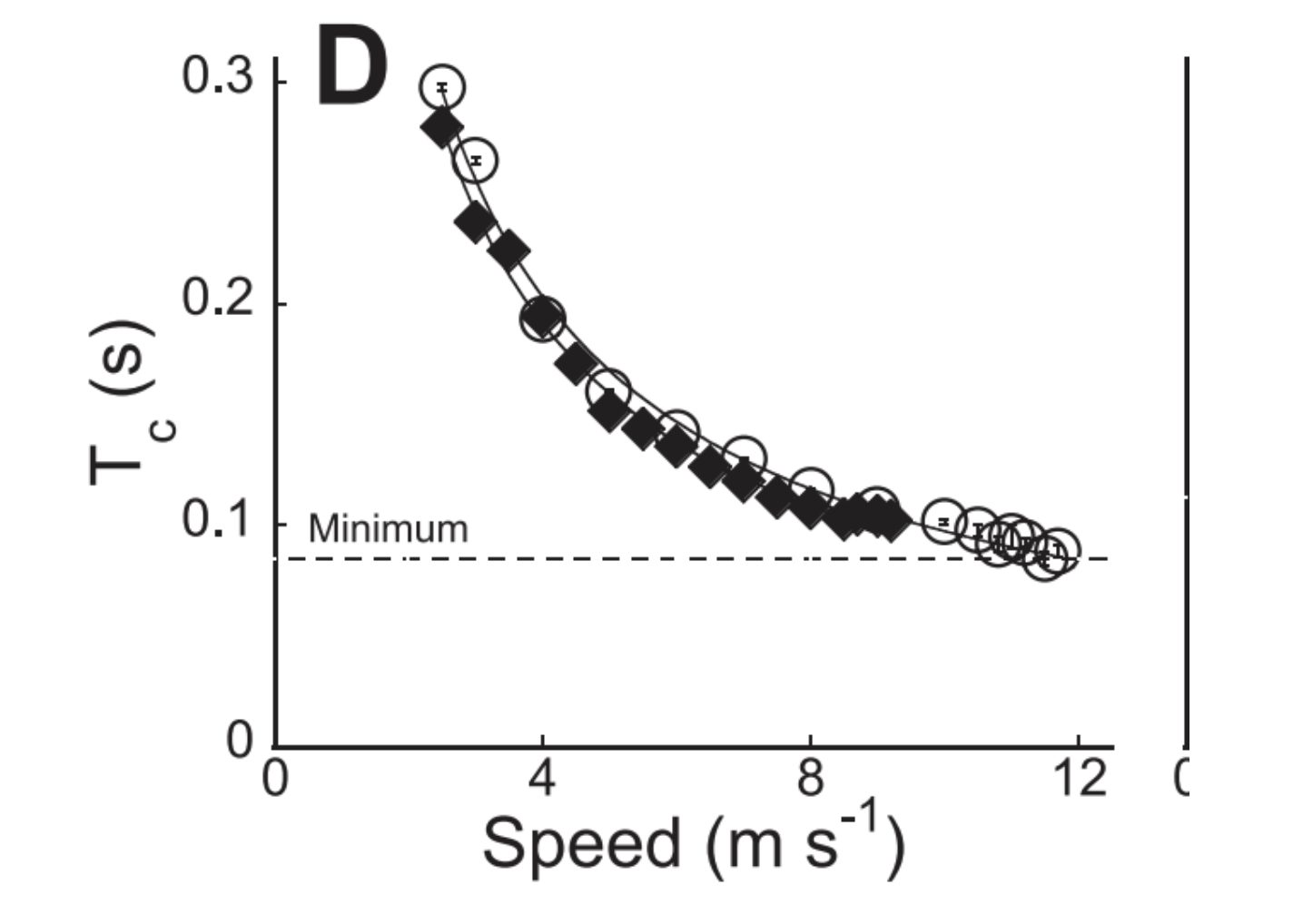
It has this plot.

This shows a decrease in contact time with speed

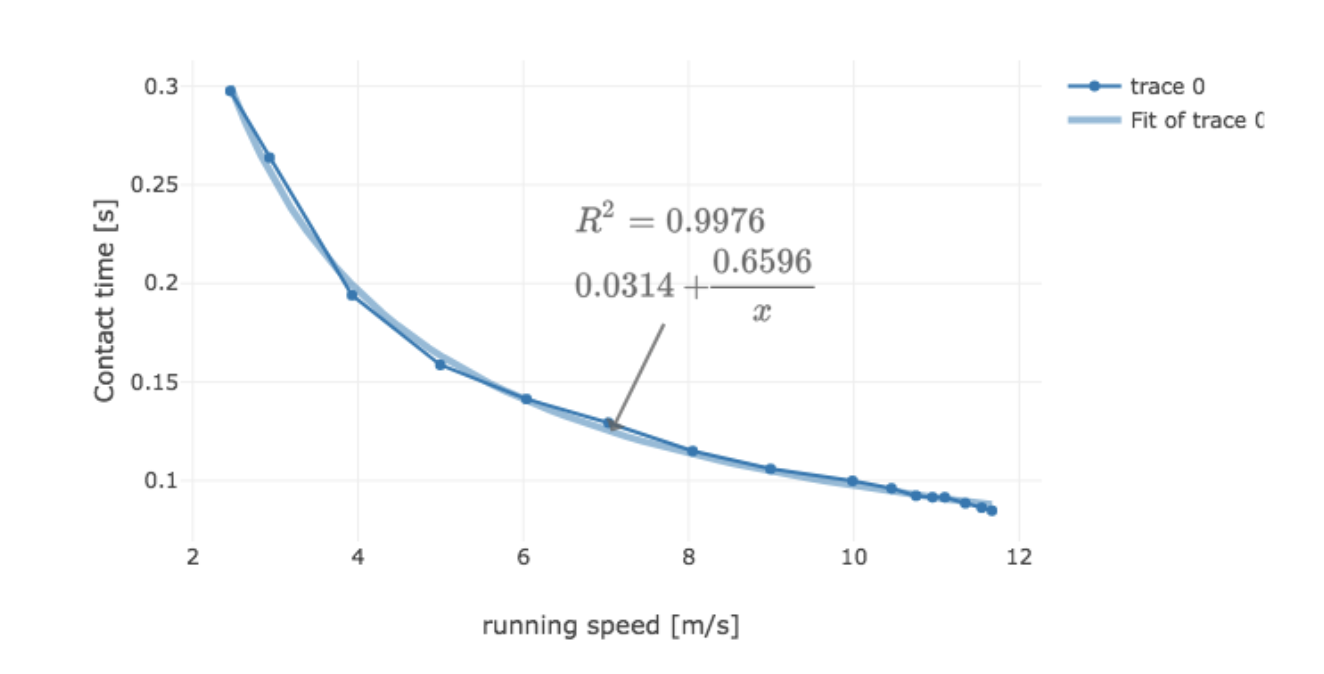
Here is what I get for a fit

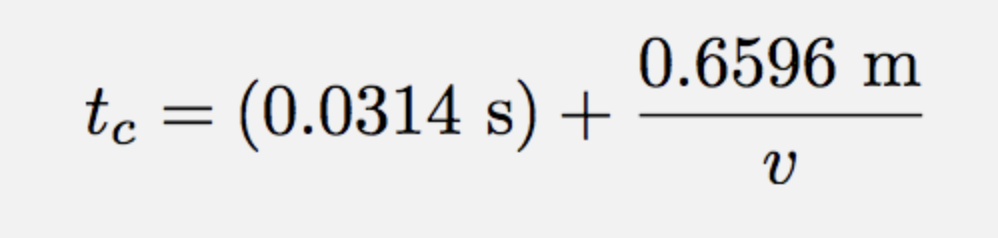
This gives a contact time function of

Although this “blows up” at v= 0.  Maybe I should say tc = 0.3612 for v < 2 and this expression for v>=2

End of notes – it finally worked.

Python Tip: User Scrolling

Just another quick tip.  Sometimes I create python to use as a demonstration. Here is an example:

https://trinket.io/glowscript/717bedba81

This is a double pendulum (sorry for the lack of embeds – I hope to fix that soon).  But there is a problem when you use the code as an embedded demo.  What happens if a user is reading over a blog post using the scroll wheel?  If they mouse over the trinket embed and scroll, they will zoom out and not see anything.

You can fix this by adding the following:

Yes, just add scene.userzoom=False

That’s it.

Python tip: Pausing

Ok, I’m going to start writing down things I learn about VPython.  First, a note.  If I say “VPython” or “Glowscript” – I’m really talking about the same thing.  In my usage, I will let VPython be a program in python with the visual module.  Hopefully, these things that I write will be the same for both platforms.

Now for today’s tip – how do you pause a program?  In the past, I have made these “start”-“pause” buttons.  It’s not super difficult to do, but there is some stuff in there that I just don’t understand. But there is a better way.

Let me start with a sample program.  This is just a ball tossed in the air – but with a pause button. Code here.

The magic happens in line 11.  When you put that scene.pause() in your program, you get a big “play” button in the lower right of your output window.  In this case, the program is paused before the calculations start so that the play button is there at the beginning.

Of course, you could have some calculations and then the pause button – it just depends on what you are trying to do.